Your firm's orchestrator.
Marcus coordinates work across your firm — routing tasks to the right AI employee, surfacing what needs attention, and keeping every matter moving from one place.
Not just chat. Real work.
Marcus interacts with your firm's actual data — matters, clients, tasks, deadlines, and documents.
Find
The work you need.
- Find a client
- Find a matter
- Find a document
- Find overdue tasks
- Find upcoming deadlines
Understand
The context.
- Summarize a matter
- Explain recent activity
- Summarize communications
- Identify missing information
- Review document status
Prioritize
What needs attention.
- What is overdue?
- What is due today?
- Which matters are at risk?
- What should I work on first?
- Workload breakdown
Act
Move work forward.
- Create a task
- Update task status
- Navigate to matter
- Open client record
- Review document
Chat in context.
Marcus works at whatever scope you need — focused on the current page or across your entire firm.
This Page mode
Marcus understands the matter, client, or document you're looking at.
Marcus scopes its response to the current page — the matter, client, or document you have open. No noise from unrelated work.
You control the scope. Switch between page-level and firm-wide context at any time during a conversation.
Marcus in action.
See how Marcus handles the questions legal professionals ask every day.
RFE response overdue
Submit to USCIS overdue
Interview prep due today
Closing checklist incomplete
Evidence collection at risk
From question to action.
Marcus turns natural language into useful work context and supported actions.
Ask in plain language.
"Which deadlines are coming up this week?"
Marcus interprets your request.
Identifies deadline-related query for the current week.
Marcus finds the relevant work.
Queries deadlines across all active matters.
Marcus surfaces what matters.
3 deadlines this week. 1 is at risk.
Move forward.
Open matter, review task, create reminder.
Marcus across FernLex.
Marcus isn't an isolated tool. He works inside your firm's operational context.
Firm Orchestrator
Navigate, create, update, review
Marcus reads from and acts on the data domains your firm uses in FernLex. Access is governed by your firm's permissions and role-based access controls.
Built for legal work.
Marcus is built into FernLex's operational core — not a separate overlay.
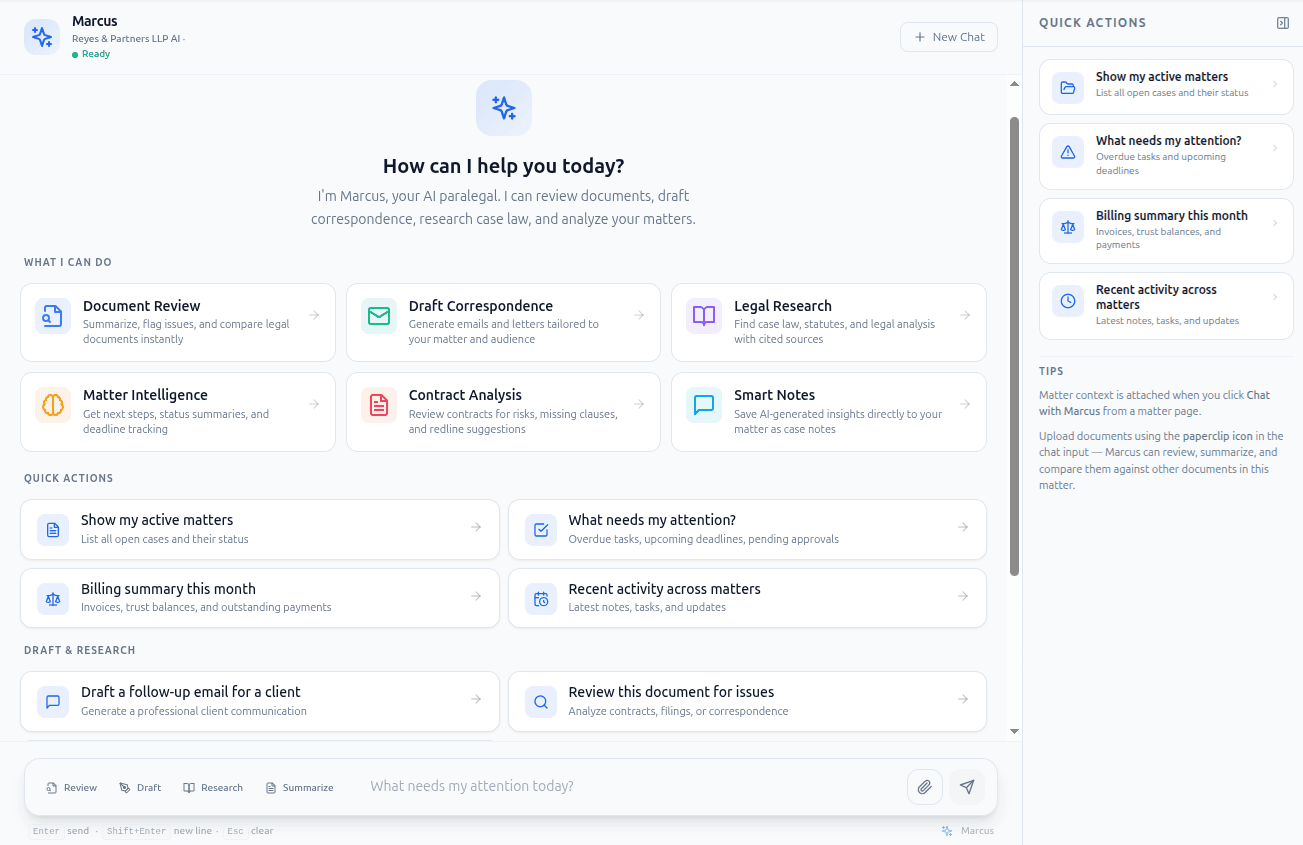
Marcus opens with context-aware quick actions and feature shortcuts.
Marcus knows your firm.
Marcus works with the data your firm already maintains in FernLex — not generic AI knowledge.
Client context
Client records, contact information, case history, and status across all matters.
Matter context
Case status, practice area, assigned team, stages, and matter-level details.
Tasks
Task assignments, priorities, due dates, statuses, and completion history.
Deadlines
Court deadlines, filing dates, response windows, and deadline status tracking.
Documents
Document storage, analysis status, summaries, and matter-linked file access.
Communications
Email threads, client messages, and matter-related correspondence.
Firm activity
Recent actions, updates, and activity across the firm's operational record.
Firm information
Firm settings, team structure, practice areas, and operational configuration.
Marcus accesses data within your firm's FernLex environment. Access is governed by role-based permissions and tenant isolation.
Built for legal work.
Marcus operates within FernLex's security and governance framework.
Permission-aware
Marcus operates within your firm's role-based access controls. What Marcus can see and do depends on who you are and what you're authorized to access.
Transparent actions
Every Marcus interaction is visible. Actions are logged. Responses reference the specific data being discussed — nothing happens silently.
Firm-governed
System-wide and per-agent controls let firm administrators enable, pause, or restrict Marcus. The firm stays in control.
User oversight
Marcus suggests actions but does not execute critical operations without user confirmation. You stay in the loop.
Audit trail
All AI activity is recorded — who asked, what was accessed, what was suggested, and what was done. Full accountability.
Tenant isolation
Your firm's data is isolated. Marcus only accesses your firm's context — never cross-tenant data.
Part of a coordinated team.
Marcus is the front door. When specialized work is needed, Marcus connects you to the right agent.
Marcus
Firm Orchestrator
Route, coordinate, and act across FernLex.
Atlas
Matter Intelligence
Build matter-level context and surface risk, gaps, and next steps.
Vera
Evidence Intelligence
Extract, analyze, and cross-reference evidence and documents.
Iris
Email Intelligence
Process, classify, and extract action items from email.
Palmer
Drafting
Generate drafts, contracts, letters, and legal correspondence.
Portia
Forms
Handle court forms, field mapping, and form packet assembly.
Put your firm's work within reach.
Meet Marcus inside FernLex. Ask about your work, find what matters, and move forward — all from one place.